
No Credit Card Required
Digital Signature
For WPForms
Collect legally binding digital signatures directly through your WPForms — no printing, scanning, or third-party tools required. Capture signatures securely and streamline approvals, agreements, and consent forms with ease.
Stop Using Paper Forms and Manual Signatures
Try Digital Signature for WPForms
Allow users to sign forms digitally using a mouse, touchpad, or touchscreen. Signatures are captured instantly and securely, saving time while improving user experience and completion rates.
Draw Signatures Easily
Users can sign directly on the form using a mouse, stylus, or touchscreen — fast, intuitive, and user-friendly.
Secure Signature Storage
All signatures are securely stored with the form entry, ensuring integrity and preventing unauthorized changes.
Legally Binding Signatures
Capture electronic signatures that support compliance and legal validation when combined with form data, timestamps, and IP tracking.
Works on All Devices
Fully responsive and optimized for desktop, tablet, and mobile devices for smooth signing anywhere.
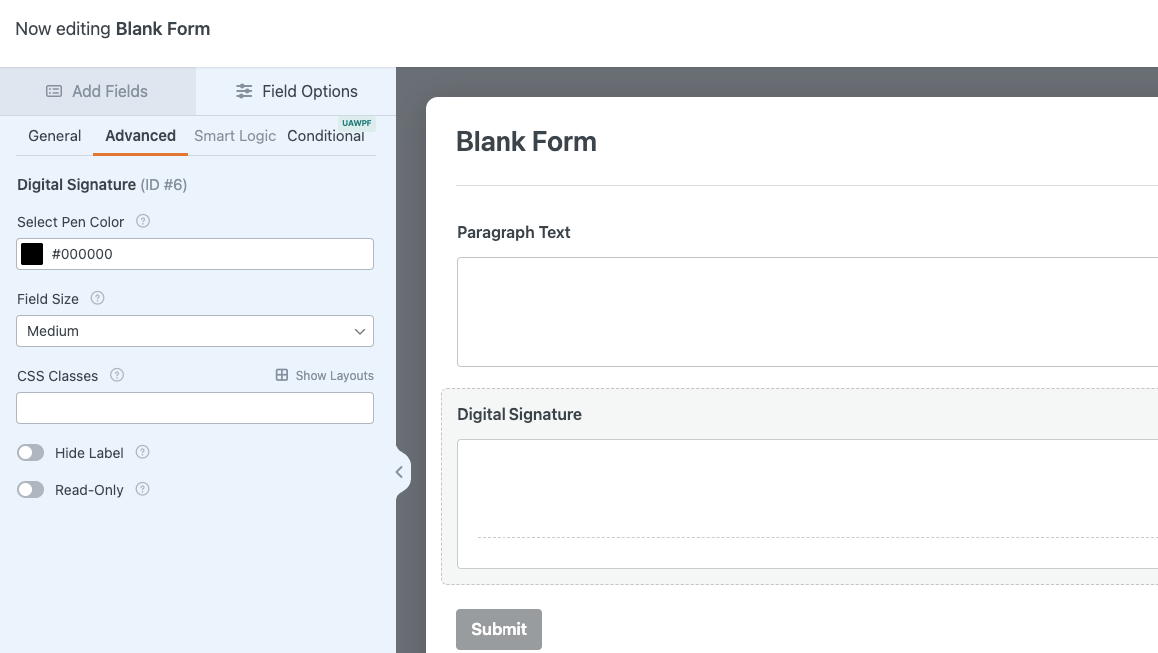
Select Pen Color
Choose the default pen color for the signature field. This color will be used when users draw their signature on the form. Select a color that matches your brand or improves visibility and clarity.
Easy Setup, No Code Required
Enable Digital Signature directly inside the WPForms form builder. Drag and drop the Signature field, customize appearance, and start collecting signed submissions instantly.
Click to Enlarge
A Sneak Peek of the Save & Resume Settings Panel
Explore the clean and intuitive Save & Resume settings inside WPForms. Enable saving, customize messages, configure email notifications, and manage resume links in just a few clicks. Designed for simplicity, security, and flexibility.
People Also Asked...
Great features on the plugin! Even in the free version.
The best support I have ever came across. Thank you
Joynal for you help
The best support I have ever came across. Thank you
Joynal for you help

scribnet (@scribnet)

The support from the team has been incredible, they
have listened to our needs, worked out solutions, and
implemented them within the plugin very quickly.
have listened to our needs, worked out solutions, and
implemented them within the plugin very quickly.
mtgagents2021 (@mtgagents2021)
What is the Digital Signature feature in WPForms?
The Digital Signature feature allows users to sign forms electronically using a mouse, touchpad, or touchscreen. Signatures are securely saved with form entries for easy access and record-keeping.
Is the digital signature legally valid?
Yes. Digital signatures are legally accepted in many regions when captured with supporting form data such as timestamps and IP addresses. Always check local regulations for specific legal requirements.
Can users sign forms on mobile devices?
Absolutely. The signature field is fully responsive and works smoothly on desktops, tablets, and mobile devices.
Can I change the pen color of the signature?
Yes. You can select a default pen color from the Digital Signature settings to match your branding or improve visibility.
Will the signature appear in form entries and notifications?
Yes. The captured signature appears in form entries and can be included in email notifications, the database, and exports.
Discover More Powerful Features!
Love this feature? You’ll be pleased to know that there’s a whole range of other powerful addons which works perfectly with our WPForms Digital Signature Addon.

Google Drive Integration
Automatically send every WPForms submission directly to your Google Drive. no manual uploading or organizing required.
Demo
File Upload Field
Easily allow users to upload images, documents, or any file type directly through your WPForms — simple, secure, and flexible.
Demo
Database addon
The Database addon helps store form data, view data in the admin backend, and export data in CSV format.
Demo
Multistep Addon
Create stunning multi-step forms with WPForms. Ideal for long forms and surveys.
Demo
Repeater Field
With this addon, you can add Repeatable Fields to WPForms. You can add all kinds of fields from text, files, checkboxes, radio buttons, textarea etc.
Demo
Mailchimp Addon
A key feature of Mailchimp Pro is the ability to add an acceptance checkbox to your forms. It will give users the choice to opt-in to receiving emails
DemoWe need your help!
Love this feature? You’ll be pleased to know that there’s a whole range of other powerful addons which works perfectly with our WPForms Database Addon.